- Open Drafts. Each row shows the vendor, status, confidence tier (GREEN, AMBER, RED), amount and whether the journal balances.
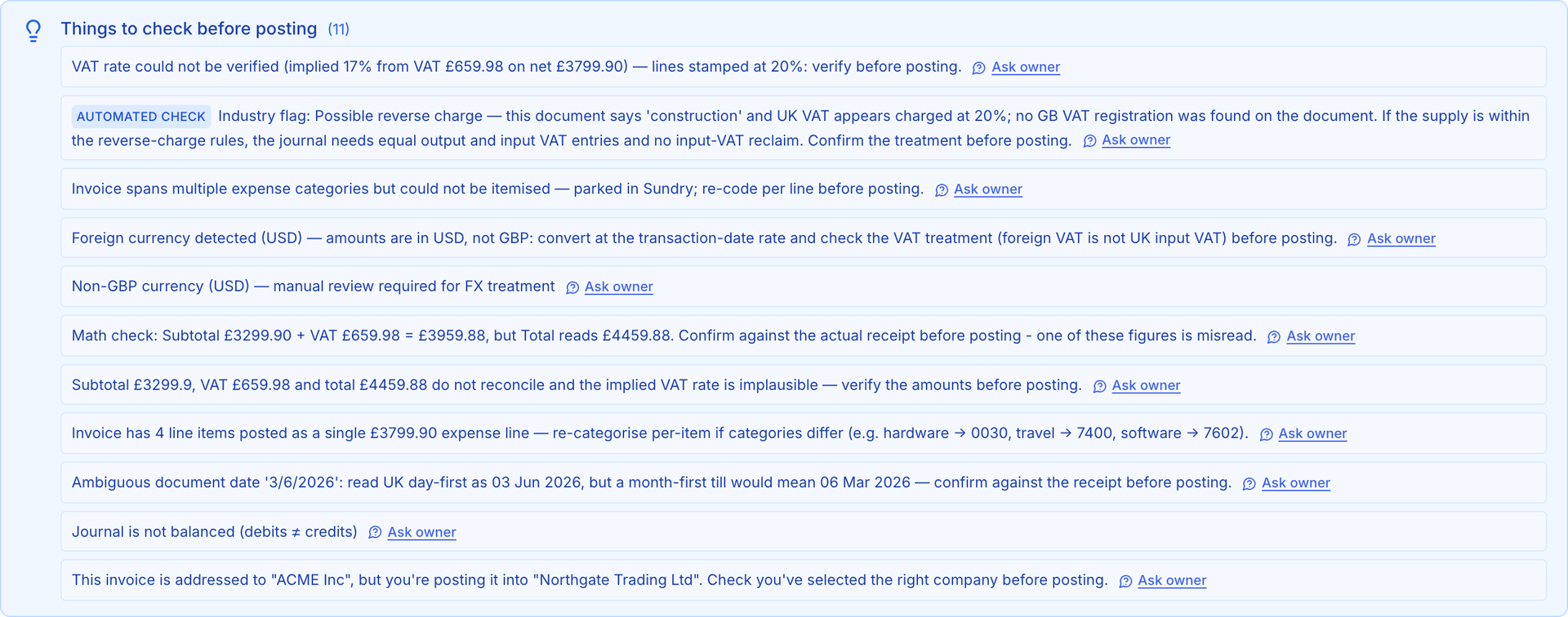
- Click Review on a draft. The top of the page shows the tier and, for AMBER and RED, a Things to check before posting panel listing every doubt AIONA has: an unverifiable VAT rate, an arithmetic mismatch, an ambiguous date, an unbalanced journal, a document addressed to a different company.
- Scroll down to the side-by-side view. The original document is on one side and the extracted fields and journal lines on the other. Correct any field directly; changing the ledger account for a supplier once teaches AIONA for next time.
- If a check needs the client's answer, click Ask owner next to it. The question goes to their portal and the answer comes back against this draft.
- When you are satisfied, approve. GREEN drafts approve in one step. AMBER drafts ask you to confirm the account, VAT and total. RED drafts stay blocked until every check is resolved or overridden with a written reason.
Approval posts a balanced journal. Posted journals cannot be edited; if you later find a mistake, reverse it and post the correction, and both stay visible in the audit trail.