Most capture tools measure themselves on one number: how much posted without a human touching it. AIONA measures something different: whether the entry that reached the ledger was right, and whether you can prove who approved it. This page walks through what happens between a document arriving and a journal posting, and what a reviewer actually sees and does at each step.
How documents arrive
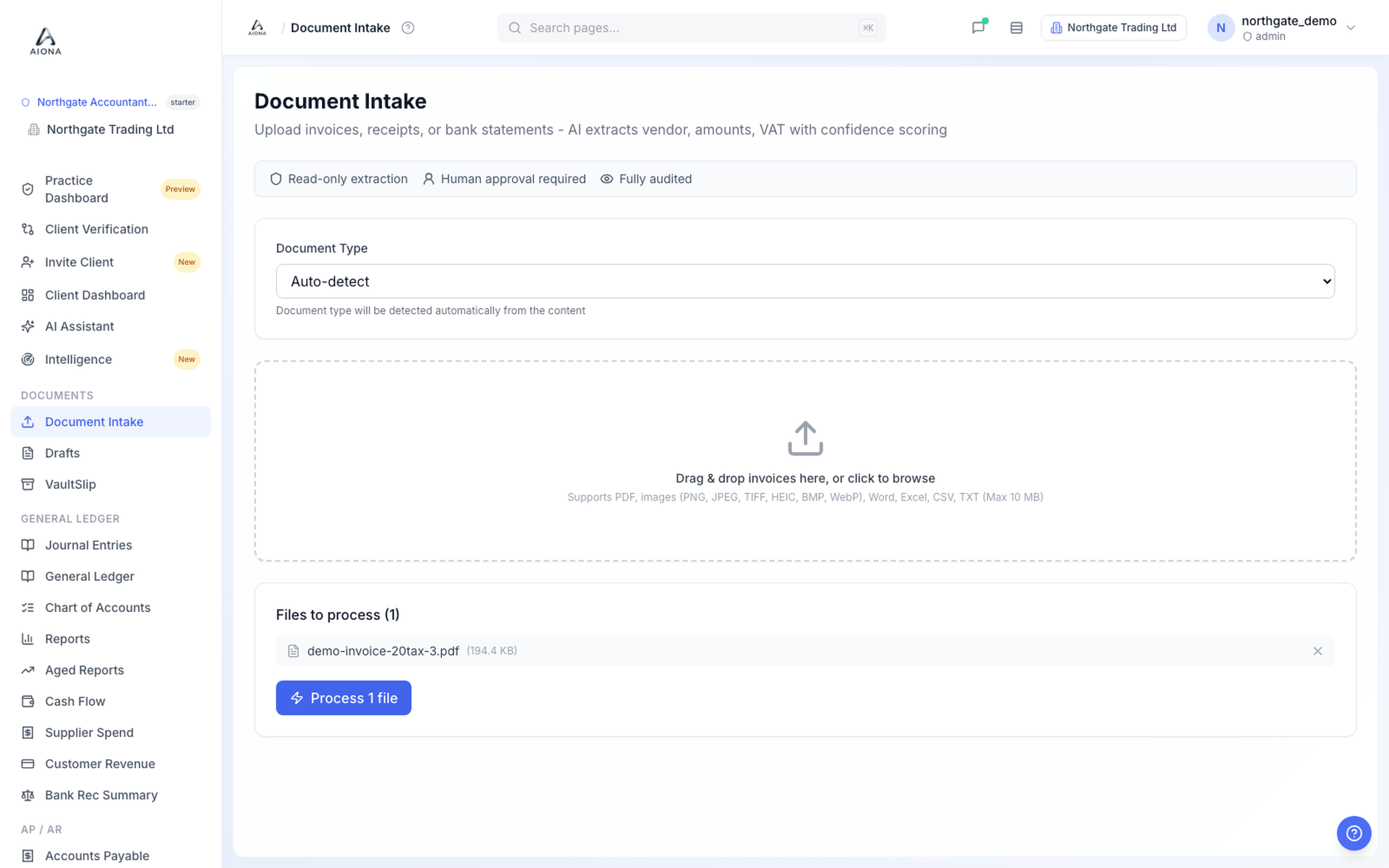
Documents reach the intake in three ways:
- Drag and drop. Drop a batch of PDFs or phone photos straight into the client's book. Multi-page files and photographed receipts are both handled.
- Forward by email (rolling out). Each client book gets its own documents address, so a supplier invoice forwarded from your inbox lands in the same queue. This is rolling out to practices now; until it reaches yours, drag and drop and the client portal cover the same ground.
- From the client. The client portal opens from a magic link, so there is no password for the client to forget. They can upload documents, answer an approval request from the practice in one tap, and respond to a missing-receipt request with an upload that lands against the exact transaction it belongs to.
On arrival, each file is classified as an invoice, a receipt, a statement or a credit note. Invoices, receipts and credit notes carry on into coding. Statements route to the reconciliation workspace instead, because a statement is evidence of money moving, not a bill to code.
A read that scores its own confidence
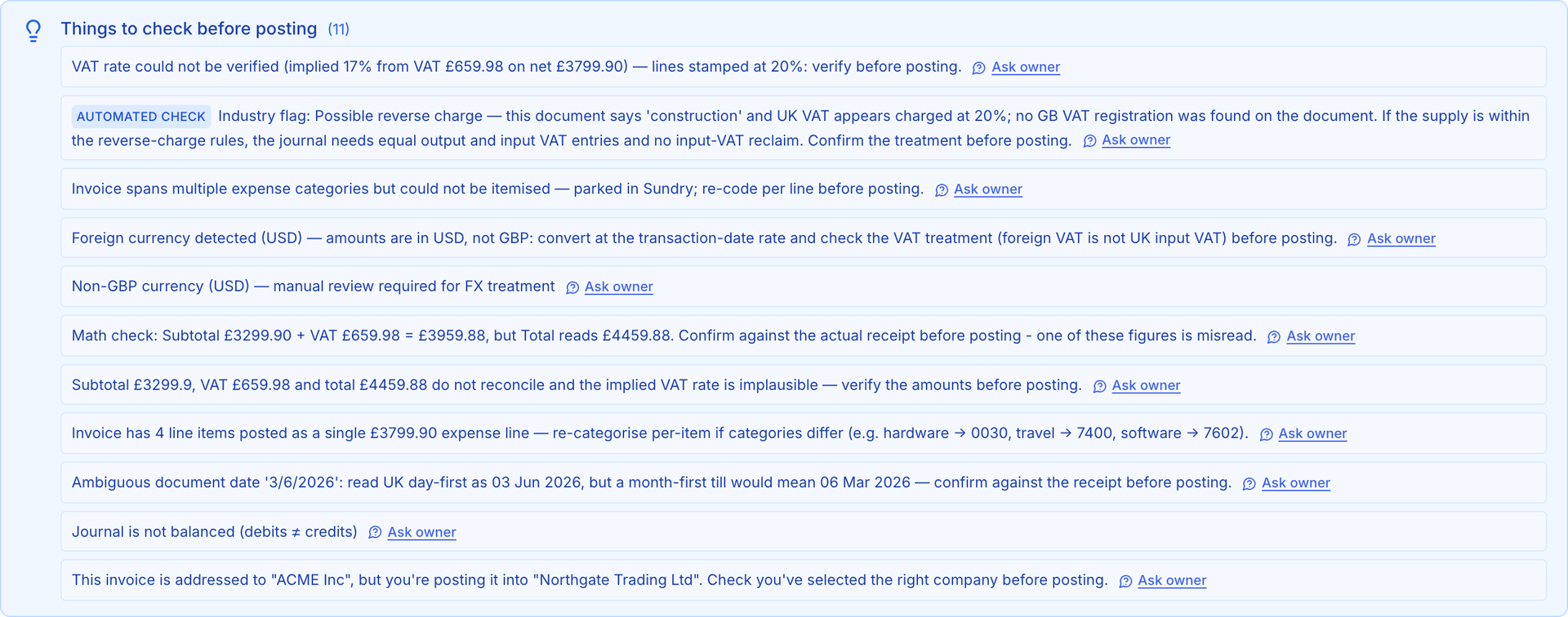
For each document, AIONA reads the fields a bookkeeper would: supplier, document date, net, VAT, gross, and a proposed ledger account drawn from the full UK chart of accounts seeded on day one. Then it does the part most tools skip. It scores its own confidence on every one of those fields individually, not just on the document as a whole.
A clean invoice from a familiar supplier might come back certain on everything. A creased till receipt photographed at an angle might be certain about the gross but genuinely unsure whether a line is standard rated or zero rated. Those are different situations, and the tiers treat them differently.
GREEN, AMBER and RED are behaviour, not decoration
The tier is not a badge on a card. It decides what the system is allowed to do next.
- GREEN: every field cleared its threshold. The entry is drafted in full and waits in the approval queue. Green never means posted; nothing posts without human sign-off.
- AMBER: at least one field is uncertain. The document queues for a person, with the doubtful fields flagged, so review starts where the risk actually is.
- RED: confidence is too low to trust the draft. Posting is blocked until a person resolves the entry. There is no setting that turns this off.
You can override a flag, but an override needs a written reason, and that reason is recorded in a tamper-evident audit log alongside who gave it and when. When an enquiry asks why an entry was approved, the answer is on file, not in someone's memory. The reasoning behind this design is set out in what AI confidence scores actually mean.
What the reviewer actually sees
Review happens against the source, never from memory. The screen splits: the original document on one side, the drafted entry on the other. Uncertain fields are highlighted, so your eye goes to the doubtful values first. The reviewer checks the supplier and date against the image, confirms the VAT split, and either accepts the proposed account or picks a different one. Fixing a field is a click and a keystroke, not a trip to another screen.
Then one action: approve. Approval is the moment work enters the books, so it is deliberate, visible and attributed to a named user.
Approval posts a real journal
On approval, AIONA posts a balanced double-entry journal to an immutable ledger. The debit and credit are explicit, VAT goes to its control account, and control accounts are locked so nothing can be dumped into them by hand. Every journal keeps a permanent link to its source document, so any figure in the file can be traced back to the paper that justifies it.
If an approved entry later turns out to be wrong, it is corrected by reversal: the original journal stays visible, a reversing journal cancels it, and the correct entry posts alongside. Nothing is silently edited or deleted, so the file always shows what happened, in order, with names attached. These posted journals are also what the 9-box VAT return is computed from, deterministically, with an immutable snapshot at close.
Corrections teach the system, and stay yours
Every correction a reviewer makes is a lesson. Recode a supplier's invoices from a sundry account to Subcontractor Costs, and the next invoice from that supplier arrives already proposing Subcontractor Costs, with a confidence that grows as your confirmations stack up. The learning is scoped to your practice only: your coding decisions never train anyone else's books, and no other firm's habits leak into yours.
Trusted suppliers, in plain terms
Trust is earned from your own approval history, supplier by supplier. When documents from the same supplier have repeatedly gone through review without changes, confidence in that supplier's coding rises and more of their documents arrive green. The trust is deliberately narrow: it covers that supplier, in your practice, for the patterns you have confirmed. And it does not survive surprises. A new VAT treatment, an odd amount or a changed layout drops the document straight back to a person.
The honest boundary
Because uncertain work queues for a person instead of posting, AIONA's headline automation rate will read lower than tools that post everything and leave the errors for you to find. We consider that the entire point. Your practice carries the filing liability, and software that hides its own doubt transfers risk to you without telling you. How we measure ourselves is published on the accuracy page, and the case for this trade is argued in full in review-first vs silent automation.
Capture is the front door of the ledger, not the whole house. From here, coded documents meet the bank in reconciliation, and clients keep paperwork flowing through the client portal. Per-client pricing starts at £24 a month with unlimited users and AI included, and your first client company is free: see pricing or book a walkthrough.